AgentsTV: Turning AI Coding Sessions into Twitch Streams
A pixel art visualizer that transforms Claude Code session logs into something you can actually watch. Simulated Twitch chat, esports narration, a Master Control Room, and way too many desk decorations.
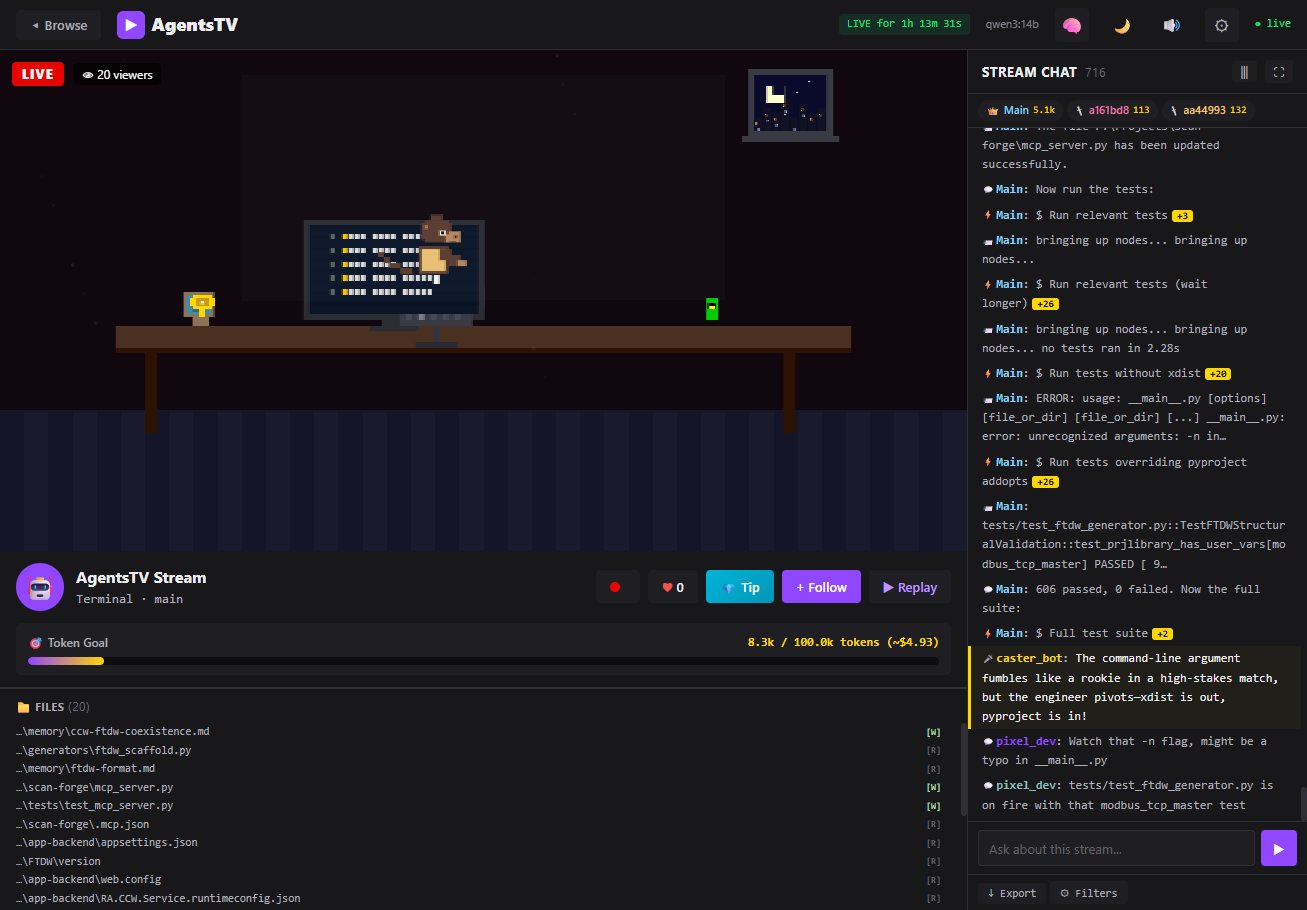
The Stupid Idea
I've been running Claude Code for basically everything lately. Which means I have thousands of JSONL transcript files sitting in ~/.claude/projects/. Each one is a full session log with every tool call, every file edit, every bash command. They're structured, timestamped, and nobody ever looks at them.
I thought: what if these sessions were live streams? Not in some corporate dashboard way. In a Twitch way. With pixel art. And chat. And an esports narrator calling play-by-play on your agent editing server.py.
So I built it.
How It Works
The whole thing is a FastAPI server that reads your session logs, parses them into structured events, and serves a web UI. You run agentstv and it opens in your browser. That's it.
pip install agentstv
agentstv
The scanner auto-discovers transcripts from ~/.claude/projects/, ~/.codex/sessions/, and ~/.gemini/tmp/. It builds lightweight SessionSummary objects with a 5-second TTL cache so it's not hammering the filesystem on every API request. The parser detects format automatically by peeking at the first few lines of each file.
Each session file gets parsed into typed events: BASH, FILE_CREATE, FILE_UPDATE, THINK, SPAWN, ERROR, COMPLETE, and so on. The parser maps tool names to event types, so a Read tool call becomes a FILE_READ event, a Task becomes a SPAWN. Sub-agent JSONL files get discovered and merged in, each with their own color assignment from a round-robin palette.
The Pixel Art Engine
This is where it got out of hand.
The pixel engine (pixelEngine.js, 1,569 lines and counting) procedurally generates a cozy desk scene for each session. Every session gets a deterministic seed that picks its palette, desk setup, window view, and decorations. There are 16 fur/shirt/chair color palettes. Three camera angles: back view (you see the character facing their monitors), side profile, and front view (where you see the back panel of the monitor instead of the screen).
Each session can have one of seven desk setups: single monitor, dual, ultrawide, triple, stacked, or laptop. The character is a monkey in a gaming chair with headphones, typing at a keyboard. The typing animation speed actually responds to what the agent is doing. Bash commands and file edits speed up the typing to 3x. Thinking mode drops it to 0.3x. Errors freeze the hands entirely for 2.5 seconds.
The Decorations
I went way overboard. There are 22 decoration preset combos, each mixing from a pool of items: coffee mugs with rising steam particles, soda cans, energy drinks, potted plants that sway, cats that periodically stretch and look around with little green pixel eyes, rubber ducks that bob up and down (and occasionally show a speech bubble), book stacks, desk lamps with flickering glow and a moth orbiting the light, figurines, trophies, cacti, headphones, snack bags, and framed photos.
The cat is my favorite. It has a tail that curls with a sine wave, and every 400 frames it alternates between sitting and standing poses. Sometimes it watches the screen.
Window Scenes
Behind the character, there's a window (two thirds of sessions get one). Six scene types: a cityscape with flickering apartment windows, a sunset mountain silhouette, a pine forest, a space view with a planet and rings, a snow scene with falling particles, and a generic night sky. Clouds drift across. Shooting stars appear every 500 frames. Some seeds get rain.
Reactions
Events trigger visual reactions on the pixel art. An error flashes the room red, shakes the desk, turns all keyboard keys red, and pops up a pixel "!" above the character's head. The character throws their hands up. Completion triggers confetti particles, rainbow keyboard keys, a green checkmark, and floating gold sparkles. The character pumps their arms. Spawn events draw expanding purple rings. Thinking events show animated dots above the head, and the character tilts their head side to side. Bash commands briefly flash yellow lightning on the keyboard.
When the agent is idle, the character runs through little animations: looking around, stretching, yawning, nodding, or checking their phone.
Simulated Twitch Chat
The right panel is a chat log. There are two channels of messages: agent events (the actual tool calls and actions, formatted with badges and icons) and viewer chat (simulated spectators reacting to what's happening).
Viewer chat is where the LLM integration comes in. If you have Ollama running locally, the system prompts an LLM to generate short Twitch-style chat messages reacting to real agent events. The system prompt is very specific: at least 7 out of every batch of messages must reference actual files, functions, or commands from the context. Generic hype reactions are capped at 2 per batch.
The prompt literally says things like:
"Reference SPECIFIC files, functions, or commands from the context (e.g. 'server.py is getting thicc', 'that grep tho')"
Without an LLM, chat falls back to a pool of built-in messages. Still works, just less context-aware.
There's also a narrator bot that generates esports-style commentary. Think: "AND THERE IT IS, the engineer commits a MASSIVE refactor to parser.py!" It fires every 20 seconds or so (configurable) and calls the LLM with a separate prompt asking for dramatic play-by-play.
You can also type into the chat yourself. If you ask a question about what the agent is doing, it routes to a different LLM prompt (SYSTEM_PROMPT_EXPLAIN) that gives context-aware answers about the current session. And other "viewers" will react to your messages.
The Master Control Room
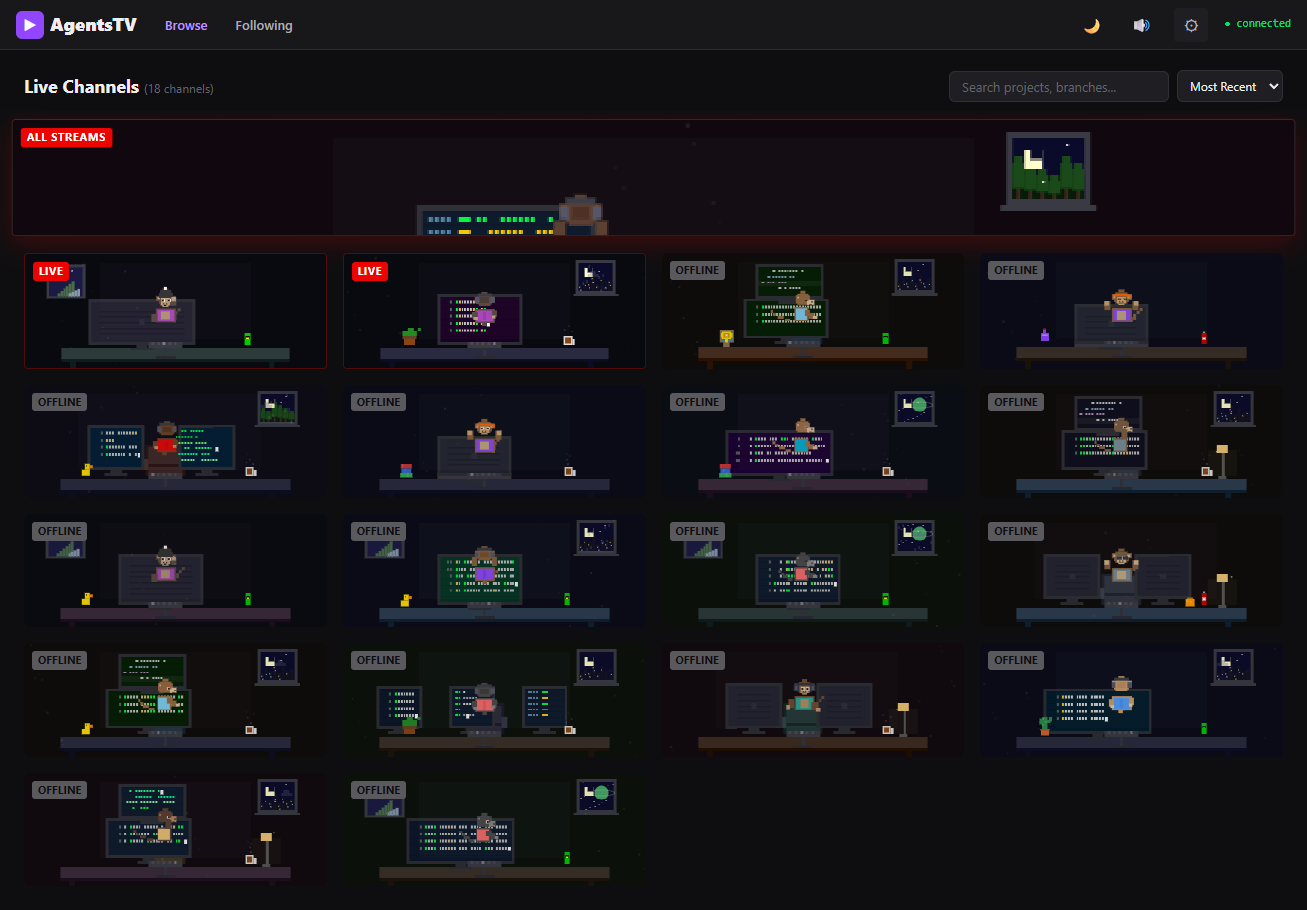
The dashboard view shows all your sessions as cards in a grid, sorted by most recent activity. Each card renders a live pixel art thumbnail at 3px resolution (versus 4px in the full session view). Active sessions get a red "LIVE" badge. You can search and filter by project name, branch, or slug.
There's a "Master Control Room" view that aggregates all active sessions into one stream. The monitors in the pixel art scene dynamically show real code content from across all sessions. The chat merges viewer messages from all projects, with colored project tags so you can tell them apart. Events from all sessions flow into one combined feed.
Session Replay
Every session can be replayed. The replay system re-creates events in chronological order, with speed control from 0.5x to 8x. There's a seek bar, play/pause, and the pixel art reacts to each event as it plays back. Seeking is efficient: it only renders the last 200 events up to the target position instead of rebuilding the entire chat log.
You can also record clips of the pixel art canvas as WebM video using canvas.captureStream() and the MediaRecorder API. Hit the record button, do something interesting, hit stop, and it downloads a file named like agentstv-clip-2026-02-28T14-30-22.webm.
Sound Effects
All synthesized with the Web Audio API. No audio files. Keystroke sounds are tiny noise bursts. Errors get a low buzzer tone. Completions play a rising chime. Spawn events whoosh. Chat messages pop. Tips get a special cha-ching. Everything is generated procedurally with oscillators and gain envelopes.
function playTone(freq, duration, type = 'sine', gain = 0.08) {
    const ctx = getCtx();
    const osc = ctx.createOscillator();
    const g = ctx.createGain();
    osc.type = type;
    osc.frequency.value = freq;
    g.gain.setValueAtTime(gain, ctx.currentTime);
    g.gain.exponentialRampToValueAtTime(0.001, ctx.currentTime + duration);
    osc.connect(g).connect(ctx.destination);
    osc.start();
    osc.stop(ctx.currentTime + duration);
}
Mute state persists in localStorage. Keyboard shortcut M toggles it.
Public Mode and Security
Since session logs contain your actual code, file paths, and potentially secrets, I added a --public flag that server-side redacts everything before it reaches the client. The regex catches API keys, tokens, JWTs, AWS secrets, GitHub PATs, Slack tokens, long base64 strings, and common secret variable patterns. Full file paths get collapsed to just filenames. Session IDs are hashed with MD5 so the real file paths never leave the server.
There's also a path traversal guard that validates every session file path is actually under the allowed directories. Rate limiting on the chat API. Input length validation. The usual stuff you add after realizing you should probably add it.
OBS Integration
There's a standalone overlay page at /overlay.html designed for OBS Browser Source. It renders just the pixel art and a transparent chat overlay, no UI chrome. So you could technically stream your AI coding session as an actual stream. Whether anyone wants to watch that is a separate question.
What Surprised Me
The z-ordering took way too long to get right. For a while, characters were floating in front of their monitors or behind their chairs depending on the camera angle. The fix was simple once I found it: always draw monitors first, then the character on top. But I went through several wrong approaches before landing there.
Performance was sneaky. The original scanner re-globbed the entire ~/.claude/projects/ tree on every WebSocket message. That's fine with 10 sessions. With 200, it's a problem. The fix was a TTL cache for the scanner, a parse cache keyed on (file_path, mtime), and capping sessions at 2,000 events to prevent memory bloat. Also had to wrap the scanner in asyncio.to_thread() because it was blocking the FastAPI event loop.
The Ollama /no_think trick was a good find. Qwen3 and similar models do internal chain-of-thought by default, which is great for complex questions but adds latency for throwaway chat messages. Appending /no_think to the prompt skips the reasoning step. Interactive replies keep thinking mode enabled since quality matters more there.
The app.js monolith hit 3,000 lines before I broke it into 10 ES modules. Should have done that earlier.
Numbers
The project is about 8,900 lines across 14 key files. pixelEngine.js is the largest at 1,569 lines. chat.js handles all the chat rendering and viewer simulation at 1,213 lines. The CSS is 1,868 lines. Python backend is around 2,000 lines across the server, parser, scanner, and LLM modules.
Dependencies are minimal: FastAPI, uvicorn, and httpx. That's it. No React, no webpack, no build step. The frontend is vanilla JS with ES modules. It went from first commit to PyPI in about two weeks.
Three agent formats supported: Claude Code (full support), Codex CLI (experimental), and Gemini CLI (experimental). The auto-detect sniffs the first few records to figure out which format it's looking at.
The whole thing started as a joke. "Wouldn't it be funny if your coding agent had a Twitch chat." Turns out, it's genuinely useful for monitoring what your agents are doing across multiple sessions. The Master Control Room view is actually how I keep tabs on parallel Claude Code sessions now. The fact that a pixel monkey freaks out when there's an error is just a bonus.